Suggestions
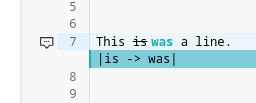
Figure 12 Suggestion example
You can make use of the Toggle suggest mode to add suggestions in a document.
You can accept or reject suggestions using the buttons visible in a suggestion card beside the editor. After clicking the suggestion card it allows you to comment on the suggestion.
Tip
You can make replace suggestion by selecting text you want to replace and start typing your suggested changes.
Resolved suggestions
To see Resolved suggestions and it’s comments open the resolved panel hidden in the topbar.
Suggestion undo/redo
Suggestions you made are remembered so you can use CTRL + Z to undo your suggestion or CTRL + Y if u want to reapply your suggestion after deletion.
Last update:
2026-10-27